Logan Brooks
Crypto expert explaining blockchain technologies in a clear and accessible way.
How To Accept Crypto Payments Via Telegram
Table of Contents
In today’s online business environment, speed and convenience in payments directly influence conversion rates. Telegram has gone far beyond being a simple messenger—it’s now a full-fledged platform widely used for communication, sales, and automation. In fact, Telegram has become one of the most popular ecosystems for crypto communities and Web3 projects, thanks to its privacy features and bot-friendly infrastructure. On this platform, you can enable instant crypto payments without building complex infrastructure or having deep technical expertise.
In this guide, you’ll learn how crypto payments work inside Telegram, why they can benefit your business, and how to quickly set up an automated payment system using Telegram bots and payment tools.
What Is Telegram?
Telegram is a cloud-based messaging platform created by Pavel Durov; it is known for its speed, security, and flexibility. Beyond messaging, it offers a powerful infrastructure for businesses: channels, groups, mini-apps, and—most importantly—bots. Through bots, companies can automate sales, customer support, and payment processing.
But what truly sets Telegram apart is its deep integration with the crypto world. No other messenger offers such a seamless connection to digital assets: Telegram has its own native wallet, a built-in cryptocurrency (GRAM, prev. Toncoin), and a thriving ecosystem of mini-apps designed specifically for crypto transactions, DeFi, and Web3 services. This makes the platform a natural home for crypto businesses and users alike.
It is this bot ecosystem that makes Telegram particularly well-suited for crypto payments: it allows businesses to automatically generate invoices, verify transactions, and provide access or services to customers—without manual intervention or the need for a separate website. Additionally, Telegram is closely integrated with GRAM, which is used for fast transactions within Telegram-based services.
Why Should You Accept Cryptocurrency Payments on Telegram?
Accepting crypto payments in Telegram offers several strong advantages for any business:
-
Massive global audience. With hundreds of millions of active users worldwide, Telegram gives businesses immediate access to a worldwide customer base. Many users are already accustomed to making purchases or subscriptions directly within the app.
-
Full automation through bots. With payment integrations, a bot can automatically create an invoice, track the payment, notify the customer, and deliver access or products instantly. This eliminates manual work and accelerates the entire sales flow.
-
Direct payments without intermediaries. Customers pay directly, without relying on traditional banking systems, often reducing delays and additional fees. Crypto transfers inside Telegram are fast and convenient, especially for international audiences where traditional payment options are slow, expensive, or unavailable.
Grow your business with crypto payments
Accept Bitcoin, Ethereum, USDT, and more using the Cryptomus payment gateway.
How to Accept Crypto Payments with Telegram?
Telegram, while being an excellent messaging app, does not provide a built-in solution for direct cryptocurrency payments. However, there are two main ways to accept payments via Telegram:
-
Simple link or QR code for payment. You can send a payment link or QR code directly to your customer, which will redirect them to a payment page where they can make the transaction to your crypto wallet. This method is easy to implement, as it requires manually sending links and codes. However, the lack of automation can make it time-consuming and increase the risk of errors, particularly as the number of transactions grows.
-
Integrating a payment system through a Telegram bot. Another approach is to integrate a payment platform via an API into your Telegram bot. This method automates the payment process by generating payment instructions for each customer automatically. It saves time, reduces manual effort, and ensures smoother transactions. With this setup, payments are securely processed, allowing you to focus on other aspects of growing your business.
So, the second option, integrating a payment system into your bot, is generally considered more effective than using a traditional wallet, as it automates the entire process, reduces manual effort, and enhances the customer experience. This approach is ideal for those who value efficiency and want to streamline their payment operations. To learn how to set this up, read the next section, where we’ll explain how to implement it with the example of the Cryptomus API.

Step-To-Step Guide on How to Accept Payments by API Integration
To accept cryptocurrency payments via Telegram using an API, one of the platforms that can be used is Cryptomus. It offers smooth integration with Telegram, allowing businesses to accept crypto payments securely and efficiently. To integrate the Cryptomus API with your Telegram bot, follow the next steps:
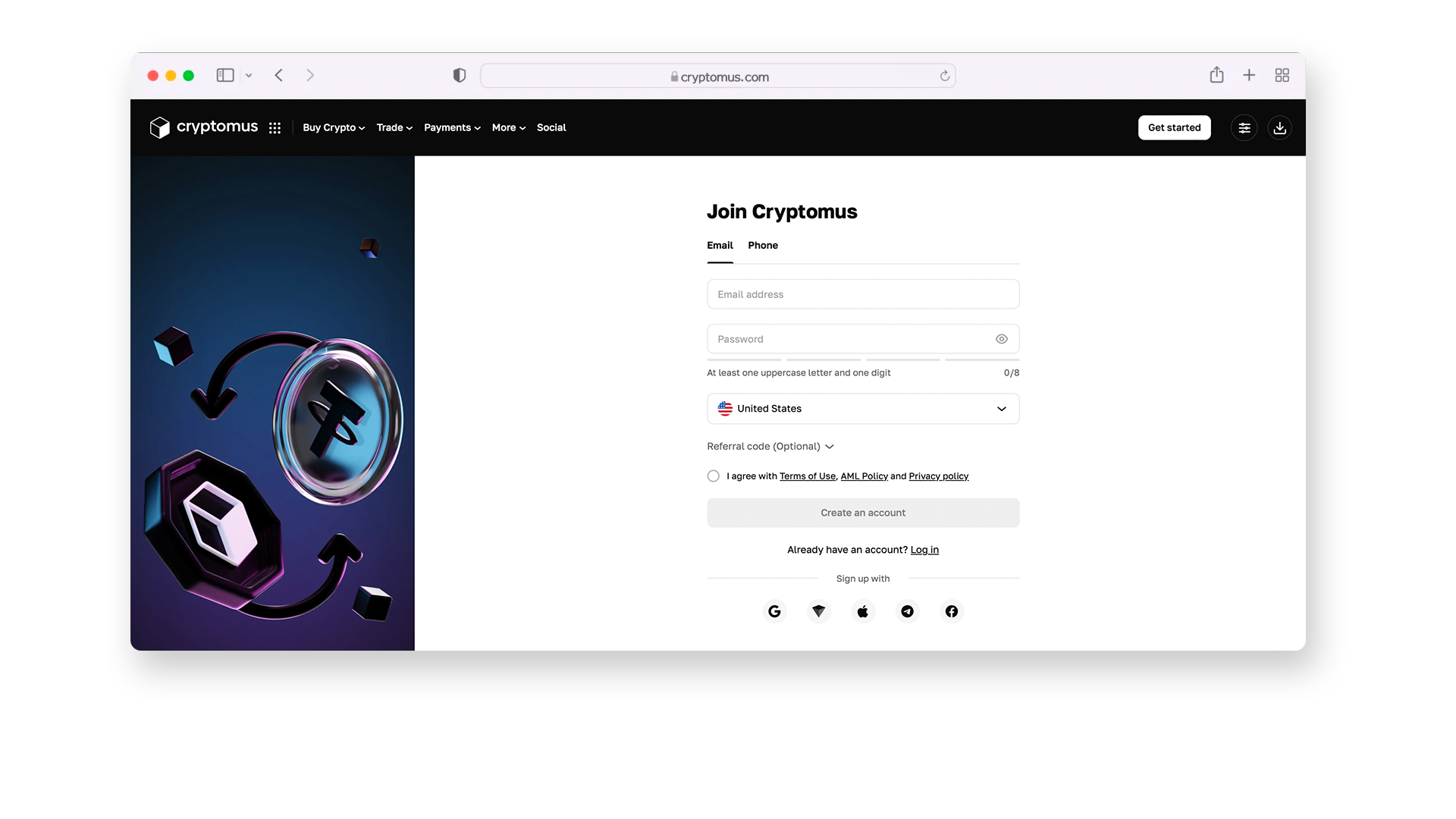
Step 1. First of all, sign up for an account on Cryptomus, if you don’t have one yet. You can choose any suitable method of registration: using a phone number, email, or doing it directly via Telegram, Apple ID, Facebook, or by linking an account to your Tonkeeper wallet.
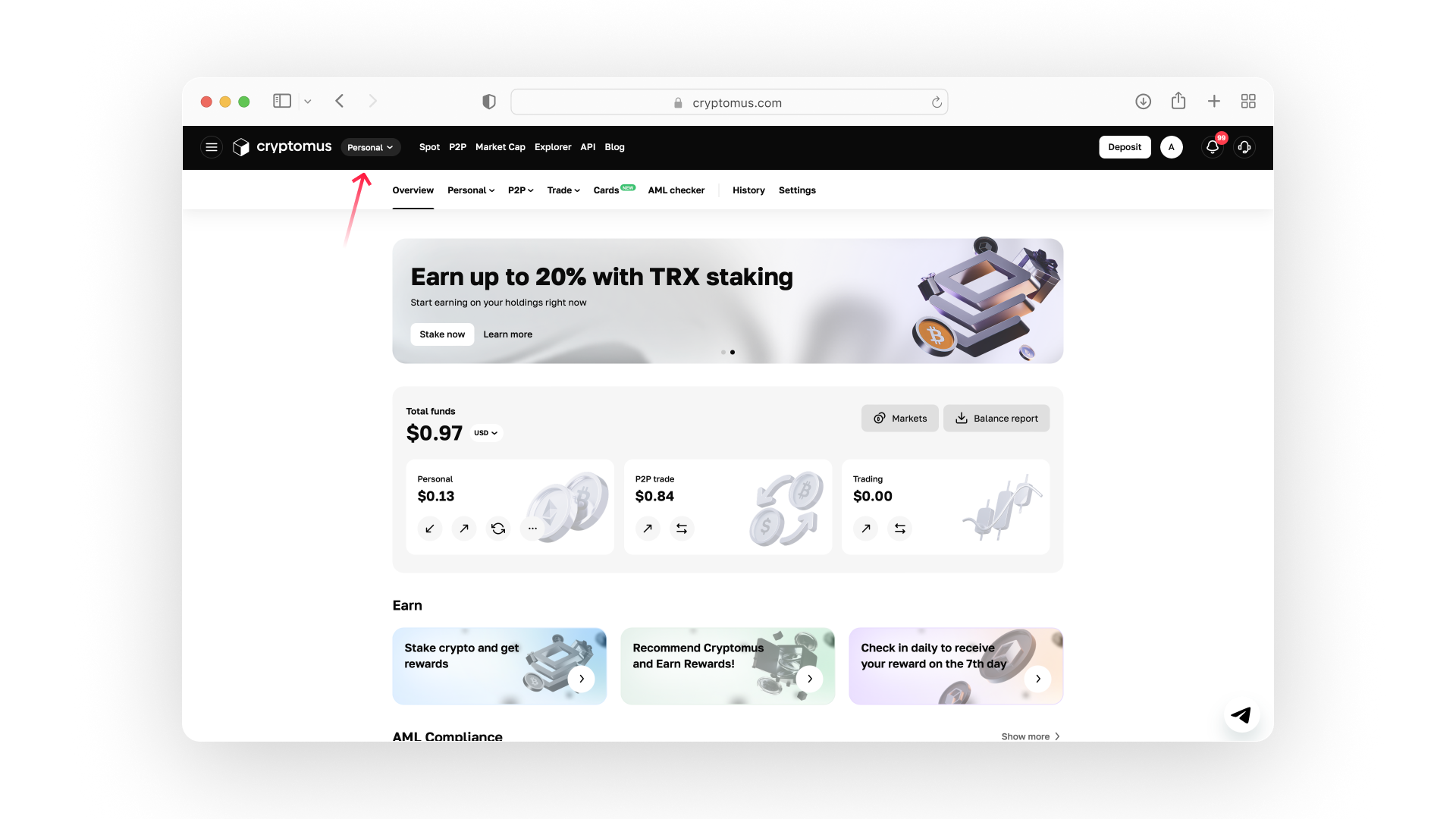
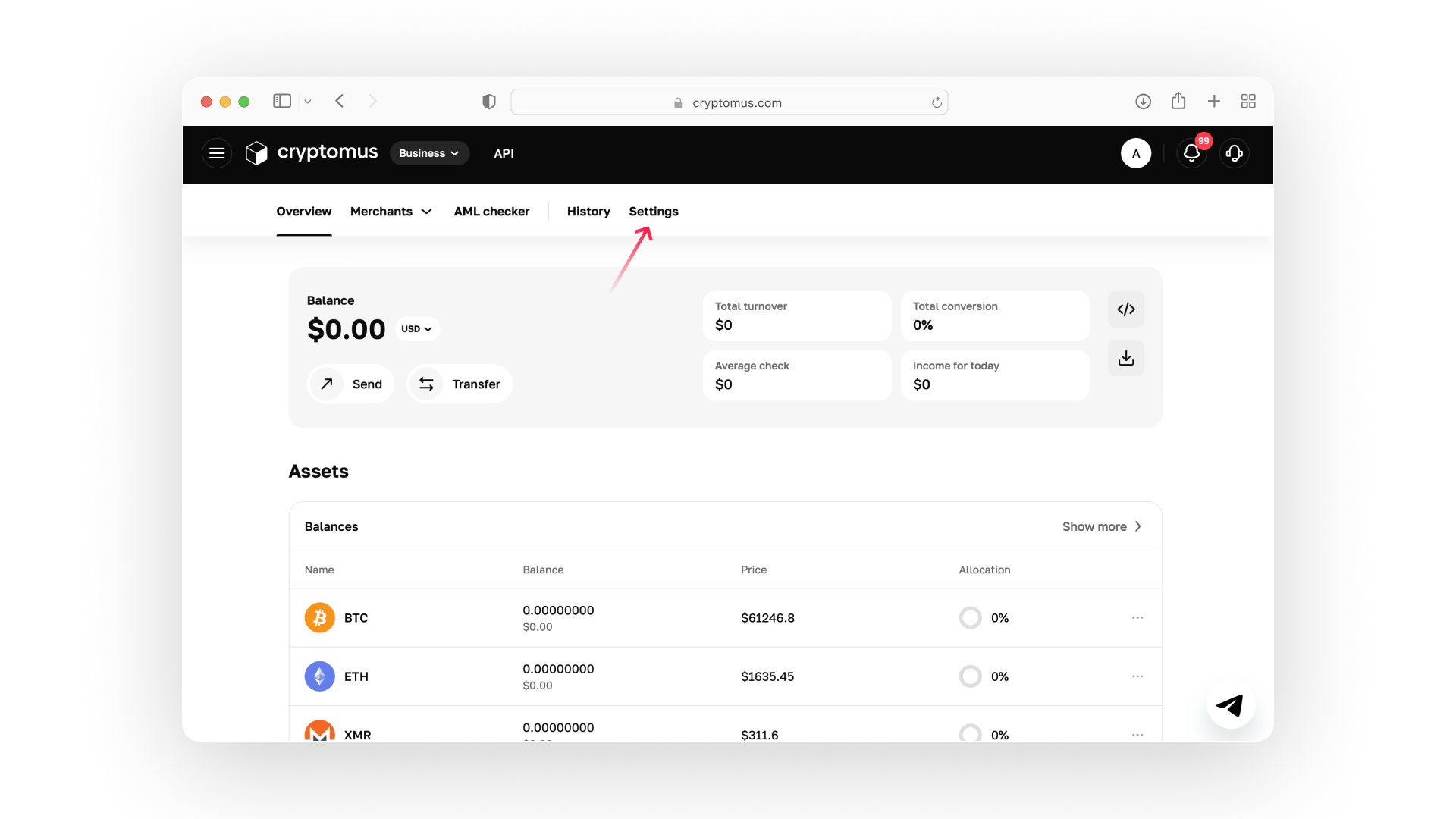
Step 2. After registering, switch from Personal to Business using the account selector at the top of the page. You will be redirected to the Business Overview dashboard, where you can set up your payment gateway.
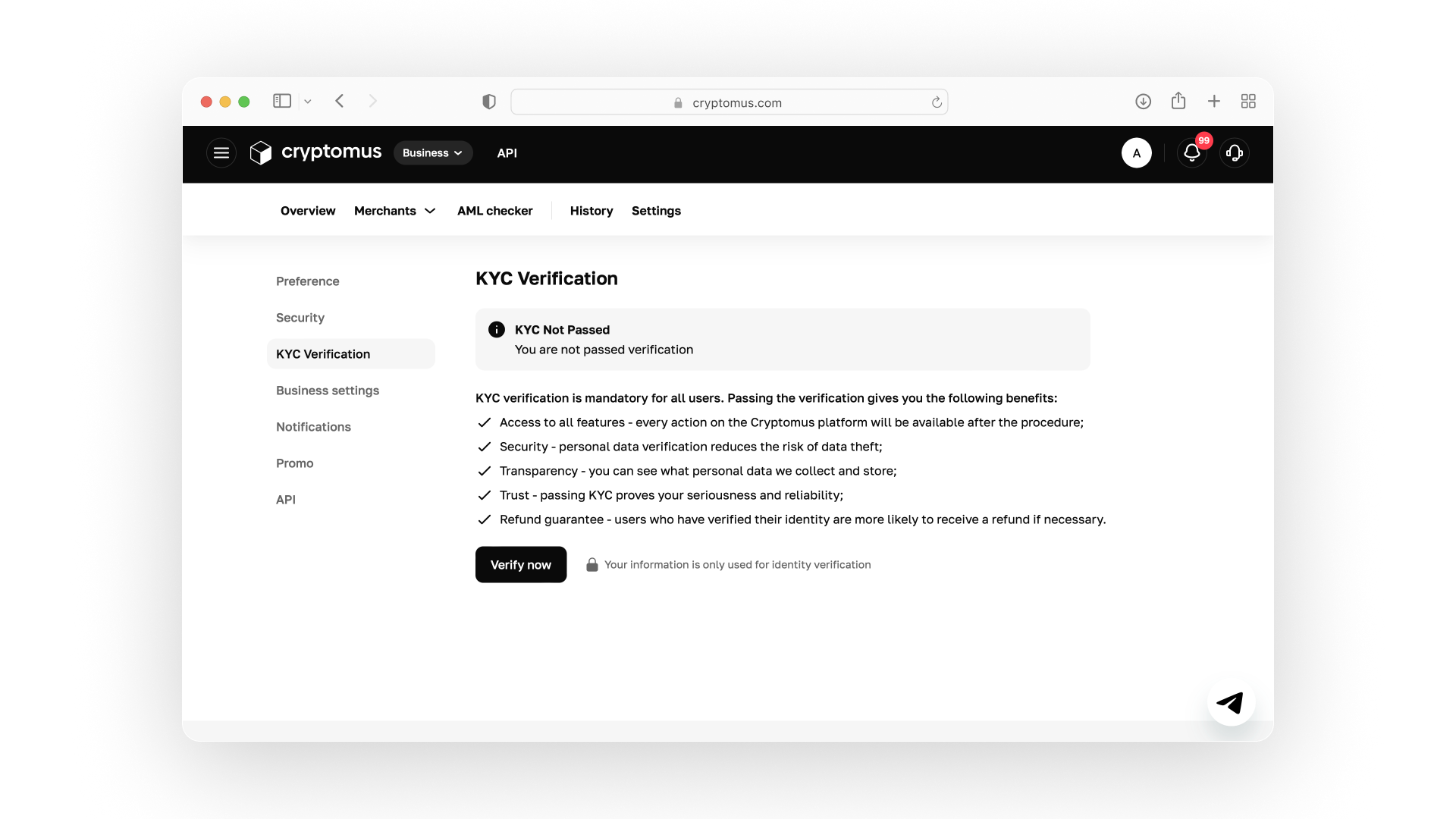
Step 3. To use the Business wallet and accept crypto payments, you need to complete KYC (Know Your Customer) verification.
Go to Settings → KYC Verification, then click Verify now and follow the on-screen instructions. Once your verification is approved, you'll have full access to Business features.
Step 4. Return to the Overview page and open the Merchants menu. Click + Create merchant, enter your merchant name, and click Create.
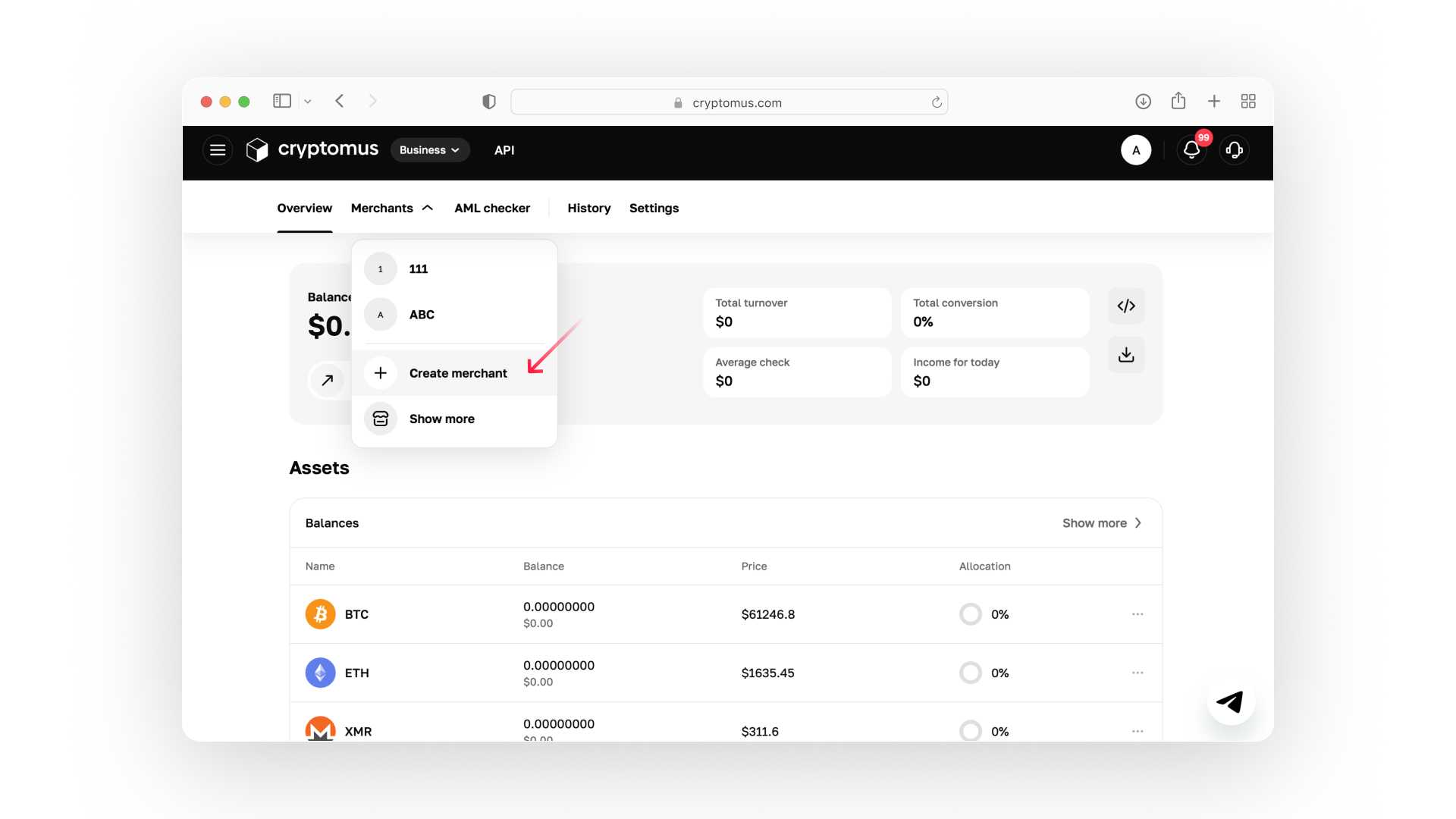
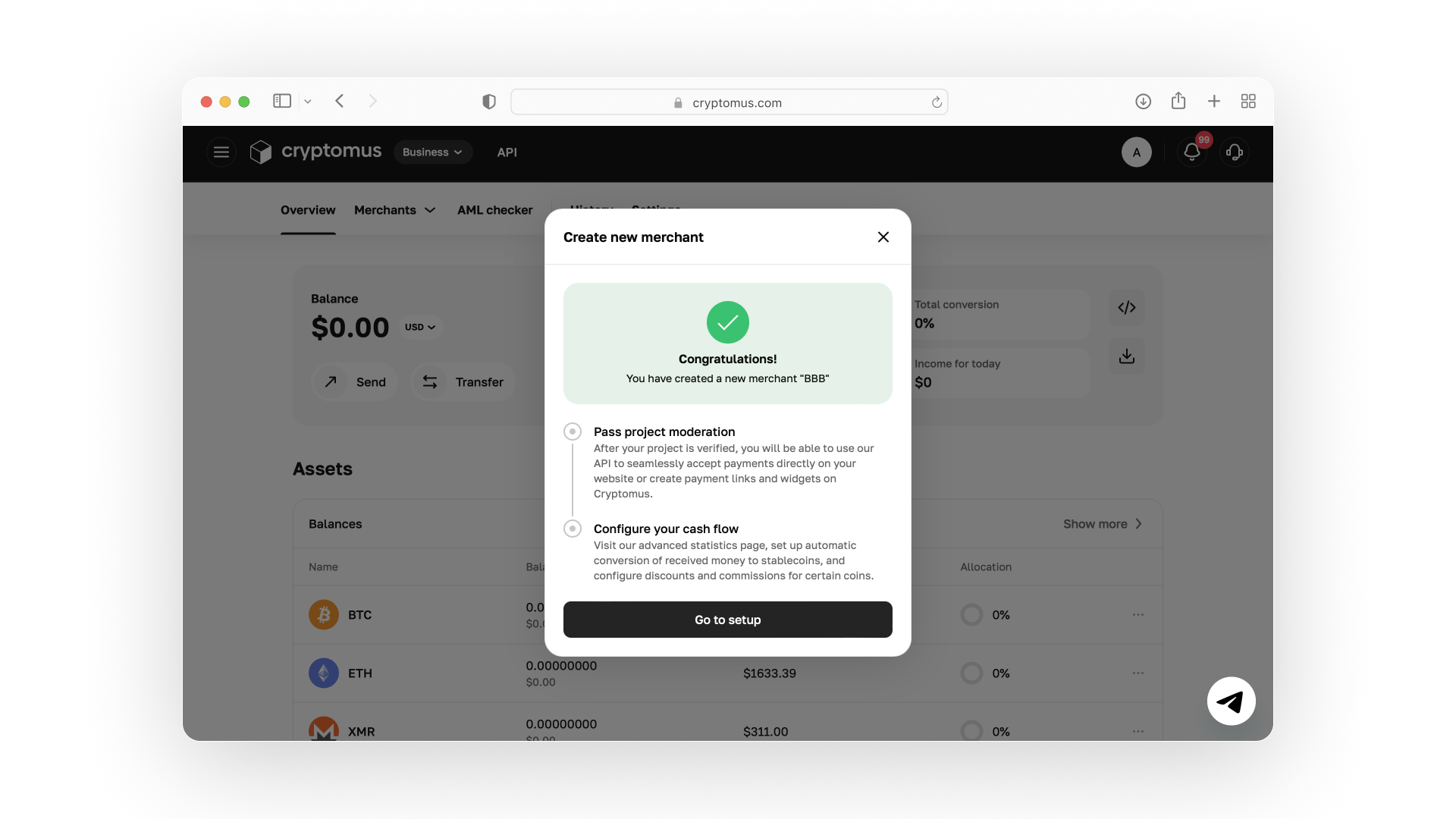
After the merchant is created, click Go to setup in the confirmation window (or select the merchant from the Merchants menu later).
Step 5. You'll be redirected to your merchant's General settings page. Click Get started under Project moderation and complete the setup by:
- adding your project URL;
- confirming your domain;
- submitting your project for moderation.
After your project is approved, you'll be able to integrate the Cryptomus payment gateway into your website.
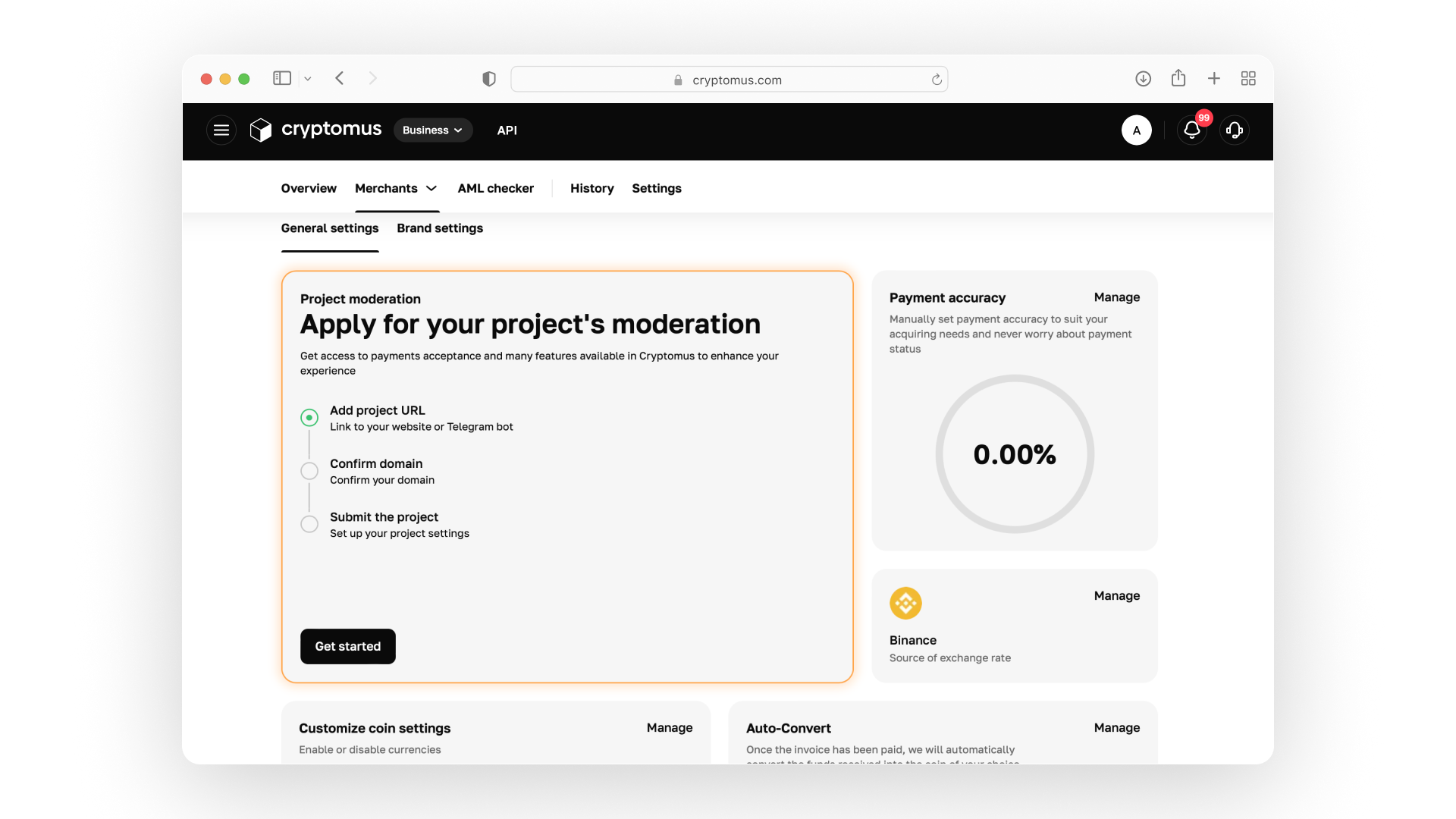
Step 6. Then you can integrate the Cryptomus API with your Telegram bot. Here, select the Telegram bot item and enter your bot URL in the field in the format “https://t.me/name-of-bot”. Then create a project name and click "Submit".
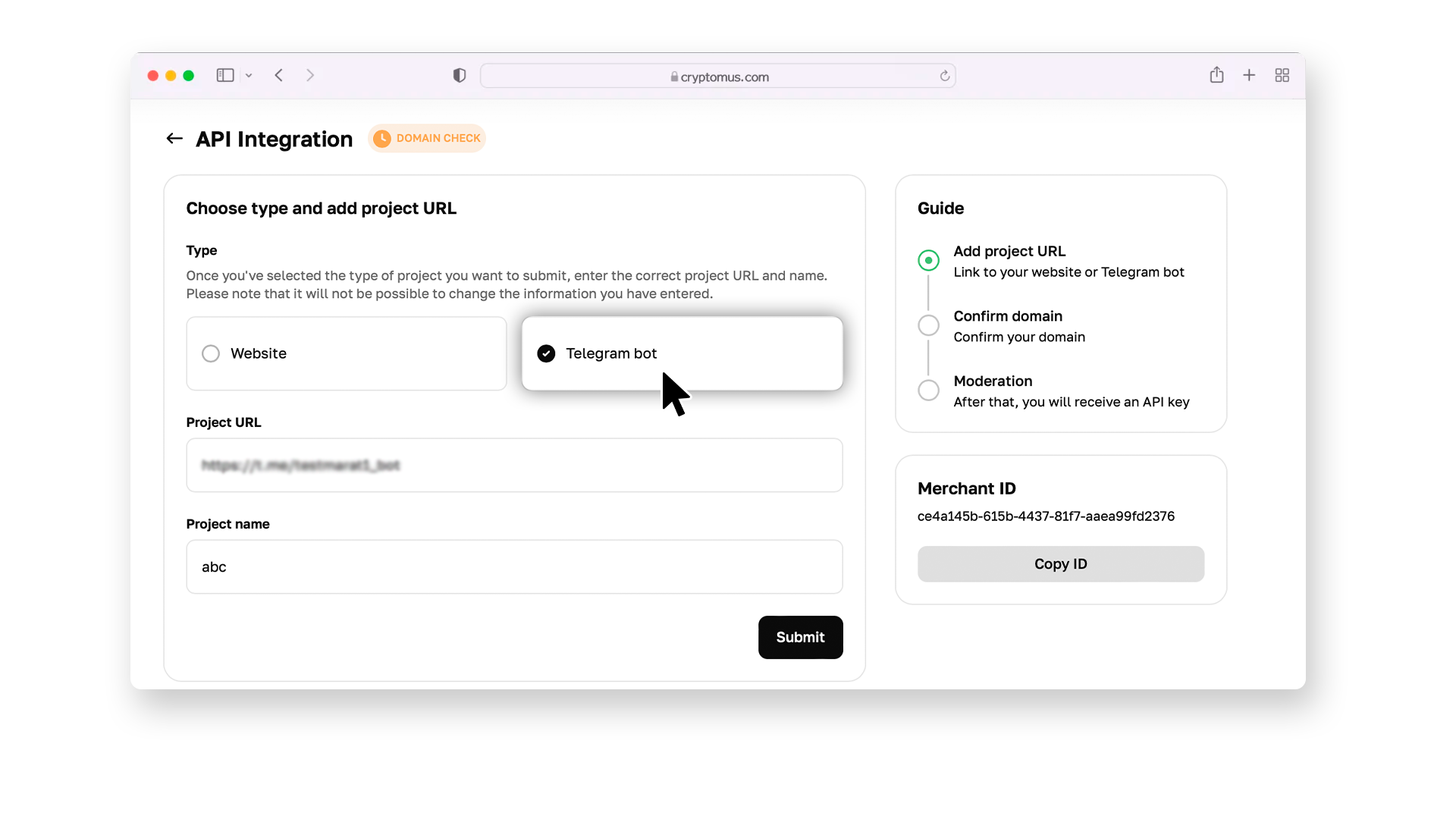
Step 7. Add the received code to the Telegram bot description and wait for moderation to confirm ownership. After moderation is complete, you will be able to copy the API key and add it to the settings of your bot.
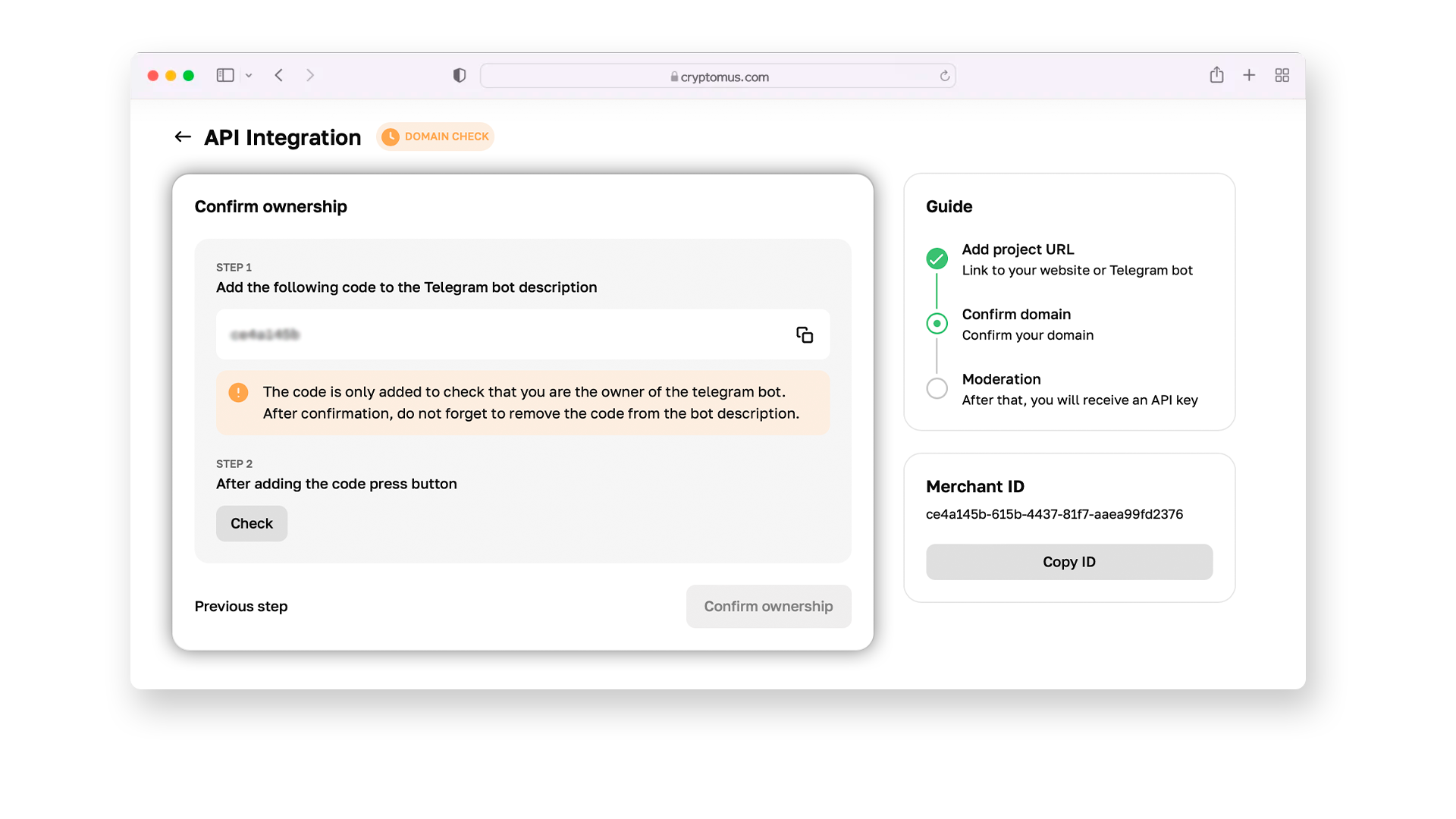
Step 8. Congratulations! Now, your Telegram bot is ready to accept cryptocurrency payments. Submit a payment request by sending a message to your customers with a payment link; it will direct your customers to the checkout page on the payment platform. Once the payment is completed, the payment gateway will notify you and your customer about the processing details via Telegram.
So, you know how to accept payments via Telegram, and if you have any questions, please contact our support service. Happy selling!
Solutions For Different Platforms
If you're using other platforms for your online business, we’ve got you covered. Below is a list of our available plugins for various systems:
| Platform | Tutorial | |
|---|---|---|
| WooCommerce | Click Here | |
| PrestaShop | Click Here | |
| WHMCS | Click Here | |
| BillManager | Click Here | |
| RootPanel | Click Here | |
| XenForo | Click Here | |
| PHPShop | Click Here | |
| Tilda | Click Here | |
| Shopify | Click Here | |
| Clientexec | Click Here | |
| Webasyst | Click Here | |
| Easy Digital Downloads | Click Here | |
| HostBill | Click Here | |
| Magento 2 | Click Here | |
| Invision Community | Click Here | |
| Azuriom | Click Here | |
| Blesta | Click Here | |
| BigCommerce | Click Here | |
| WISECP | Click Here | |
| CS-Cart | Click Here | |
| WatBot | Click Here | |
| Amember | Click Here | |
| Joomla VirtueMart | Click Here | |
| Telegram can be an effective channel for accepting cryptocurrency payments, especially if you’re looking to automate sales and simplify transactions. By integrating a payment solution with your bot, you can streamline the payment process and improve the overall customer experience. |
Thank you for reading this guide! If you have any questions, feel free to reach out to comments.


Simplify Your Crypto Journey
Want to store, send, accept, stake, or trade cryptocurrencies? With Cryptomus it's all possible — sign up and manage your cryptocurrency funds with our handy tools.
Get Started